What is a Shipper?
The BlueTrace system has an object in it called "Shippers" - these are the companies who help get your product from your facility to the end customer. Ex shippers: NWD, Araho, Southwest Airlines, Ocean Express, Sorensen, FedEx, UPS, etc.
How to Create a Shipper
- In the BlueTrace web application (https://app.blue-trace.com/), click "Ship"
- Then click "Shippers"
- Then click "Add Shipper"
- You can enter a name, and optionally you can add an address if you think you might want that printed somewhere
Add Shipping Sequences to Customers
A "Shipping Sequence" are the shippers that will carry your product, often times there are multiple shippers for product to make it across the country for folks that ship across the US or Canada.
To create a shipping sequence, you can do this from the customer record or during sales order creation. Here's how you do this from the customer record:
Ensure Sales Orders Use Shippers
When you fill out a sales order, if your customer has 1 shipping sequence assigned, it will auto-populate into the Shippers field. But if there's more than one assigned, you need to select which one this particular order will use.
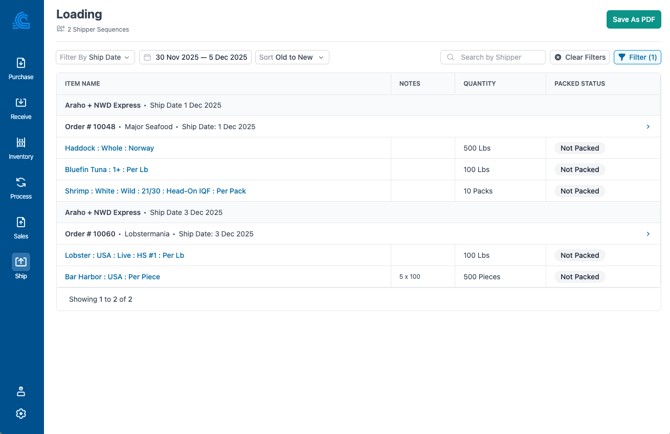
Loading Report
The loading report helps organize all your customer orders by shipping sequences. If you only want to see the orders that contain a specific shipper, then filter the Loading Report.
- Click Ship
- Click Loading
- Ensure the ship date is correct, filter by shipper as needed
- Note: You can make various fields required on the sales order form so these critical fields are not missed. Do this from Settings > Sales Order > Sales Order Form > check off any field you want to make required
- You can filter and export this to share information with your shippers